SmartPage gives your clinic a public page where patients book a real open slot.
One page per clinic with your doctors, services, and accepted insurers, a booking funnel that works on an ordinary Android phone, and a patient portal that shows only what you release. Switched on for your clinic by ITIG Tech once it is set up.
What is on the page
- The clinic
- Name, address with a map link, phone, WhatsApp, and email, and the line “Online booking by ITIG Clinic”.
- The doctors
- Each listed doctor with a specialty, what they treat, and a short note in Arabic, French, and English.
- Services
- The appointment types you make public, each with its duration, and a price only if you choose to show prices.
- Insurers you accept
- Up to eight insurer names, and nothing else about them.
- Your page address
- A public address you choose, kept separate from anything internal. In the app, all of this is set under “Clinic page” by the clinic owner or an admin.
What the patient sees
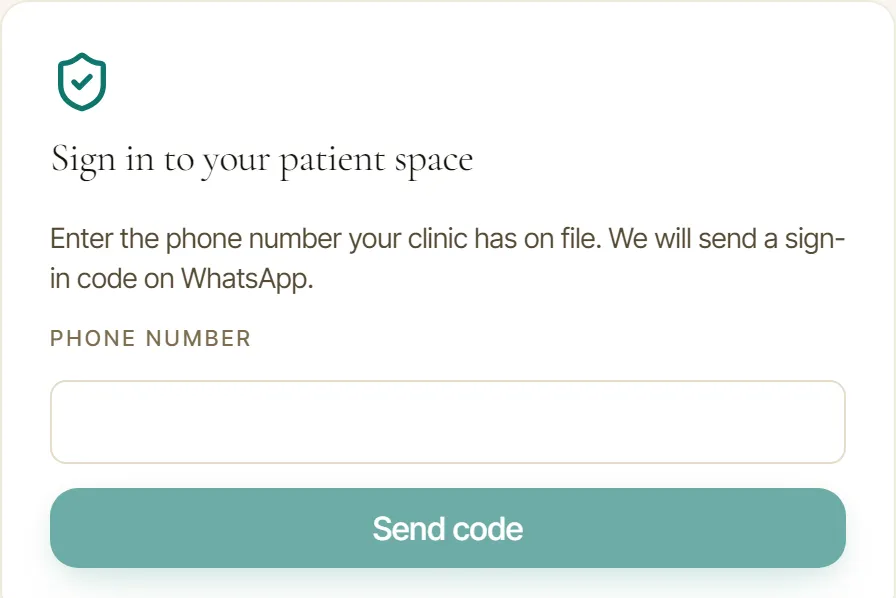
The portal sign-in. A six digit code goes to the phone number the clinic already has, and the patient never picks a password.
From the poster to the calendar
The booking page has its own address. A clinic prints it however it likes, on a poster or as a QR code it makes itself.
How a booking happens
The funnel is one column, large targets, no heavy assets, in Arabic, French, or English with a real right-to-left layout.
Branch, doctor, service
The patient picks a branch if you have more than one, then a doctor, then a service.
A real open time
Slots come from each doctor’s declared working hours, minus appointments, absences, closures, and other people’s holds, on a 15-minute grid. By default a slot must be at least two hours ahead and within 60 days. A doctor with no declared hours gets no public slots.
A held slot
Choosing a time holds it for seven minutes, with a countdown driven by the server. If the hold lapses, the details stay and the patient picks a time again.
Details
First name, family name, and phone are required. Email, the reason for the visit, allergies, medicines, conditions, and insurance are optional. The patient can tick a WhatsApp opt-in for confirmations and reminders, and nothing else.
Consent and confirmation
The patient reads your privacy notice, ticks consent, and types their full name. The appointment is written to your calendar in one transaction that cannot double-book, and the patient sees a booking reference to show at reception.
Your review
Every booking waits in the “Online bookings” inbox until your staff link it to an existing patient, create a new one, or decline. Nothing enters a chart before that, and no patient is matched automatically by phone number.
The rules
- Cancel, not reschedule
- A patient can cancel from the same browser session. To change a time they cancel and book again, or your staff move the appointment.
- WhatsApp only when asked
- A confirmation and reminders 24 hours and 2 hours before the visit go out only when the patient opted in and your clinic’s WhatsApp number is connected with approved templates. The booking completes either way.
- Priced per clinic
- Never per patient. No limit on bookings or on patient logins.
- Abuse limits
- A Cloudflare Turnstile check protects the time step, each phone number can hold five booking requests per day, and a clinic or patient that does not exist gets the same “not found” as one that does.
- Every step audited
- Holds, confirmations, cancellations, and staff decisions are written to the clinic’s audit trail, with identifiers only, never the content of the form.
The patient portal
- Sign-in
- A six-digit code sent on WhatsApp to the phone your clinic has on file, valid for five minutes, once your clinic’s WhatsApp number is connected and its message templates are approved by Meta. Accounts are issued by your staff. Patients cannot register themselves or attach themselves to a record.
- What a patient sees
- Upcoming and past appointments, visit summaries limited to the doctor’s instructions, documents, and prescriptions. Each category only if you switch it on, and each item only after your staff release it. Until then the portal says nothing has been shared yet.
- Not in the portal
- Invoices and payments. They stay on the separate public invoice link the clinic sends.
- Its own door
- The portal has its own sign-in, its own session, and a second database-level boundary that limits every read to that one patient.
Before it goes live
Online booking is switched on per clinic by ITIG Tech after your page, doctors, working hours, and services are set up and the security check is configured. Publishing the page is an explicit, audited action by the clinic owner. Put the page address on a QR code in the waiting room and on your business cards and it is ready.
Price
| Solo | Duo | Clinic | Polyclinic | Network | Enterprise |
|---|---|---|---|---|---|
| +$29 | +$39 | +$49 | +$69 | Quote | Quote |
| 1 doctor | 2 doctors | 3 to 5 doctors | 6+ doctors |
|---|---|---|---|
| $49 | $59 | $79 | $109 |
Prices are monthly, in fresh US dollars. Network and Enterprise on quote. The full pricing tables.